
Usage recommendations
In this article:
Usage recommendations#
This section provides guidelines on using database services in K2 Cloud.
MySQL#
Service launch options#
Single DBMS instance running on a virtual machine instance in a single availability zone.
High-availability DBMS deployed in a cluster of three virtual machines in one or three availability zones (if available in the region). The cluster can contain:
Three full-featured nodes. Data is distributed across three copies, each of which can be used independently.
Two full-featured nodes plus a cluster arbitrator. This option requires fewer resources and is, therefore, more cost-effective. Only two DBMS nodes act as worker nodes, while the third node maintains the cluster quorum. The instance with a cluster arbitrator runs using minimum resources: 2 vCPU, 4 GiB RAM, and 16 GiB volume.
High-availability solution architecture#
For MySQL clustering, we use Galera. All nodes of such a cluster are active simultaneously, so you can perform any read and write operations on them. However, the application you are using must support a DBMS configuration with multiple masters. If multiple instances of an application perform non-coordinated (non-transactional) actions on a multi-master DBMS configuration, this can lead, for example, to an increase in the number of deadlocks.
If you are not sure that your application will correctly read and write to all nodes simultaneously, it is better to use the following approaches:
Work with only one DBMS cluster node at a time and store a copy of the data on the other nodes so that they can take on the load if the first node fails.
Write to only one DBMS cluster node and use the other nodes to read data only.
A good way to implement the described approaches is to use ProxySQL. This tool receives queries from an application and redirects them to DBMS nodes. At the same time, it can, in line with the specified rules, distribute operations across specific nodes, cache DBMS responses, modify queries, etc. ProxySQL automatically detects the failure of the database cluster nodes and instantly switches over to the running nodes.
For more information about ProxySQL capabilities and setup, read the official ProxySQL documentation and project wiki. To add a DBMS server to your ProxySQL as a backend, use the instruction.
Request distribution using HAProxy#
For the usability of MySQL high-availability service, we have embedded HAProxy service into it to monitor the statuses and roles of nodes and automatically distribute requests. Requests are routed either to the first cluster node or to the next available node if the first one becomes unavailable.
HAProxy service runs on each of the cluster nodes at port tcp/5000. Therefore, you can just send a request to this port on any of the nodes, and HAProxy will route it to the correct node.
To benefit as much as possible from the high-availability service, use HAProxy ports of all nodes when connecting to MySQL. The better way is to configure another balancing service on your application side. You can either use cloud load balancer or deploy your own.
Connecting to the DBMS#
After the successful launch, info on addresses and ports that DBMS listens can be found on the MySQL database page.
MySQL instances listen to the tcp/3306 port. Use this port to connect to and then work with the DBMS.
Important
The cluster allows you to maintain the database availability even when a node fails, but only if you use all cluster endpoints rather than any one of them.
The DBMS can be managed via the standard mysql console client in Linux and using graphical tools such as dbForge Studio, MySQL Workbench, phpMyAdmin, etc.
If you want to connect to the MySQL service remotely, be sure to assign an Elastic IP to the instance with the deployed service and allow connections to the tcp/3306 port in the corresponding security group.
Important
Be careful when permitting access to MySQL from the Internet. We recommend restricting access to individual IP addresses and providing strong passwords.
PostgreSQL#
Service launch options#
Single DBMS instance running on a virtual machine instance in a single availability zone.
High-availability DBMS deployed in a cluster of three or six instances in one or three availability zones (if available in the region). The cluster can contain:
Three full-featured nodes. Data is distributed across three copies, each of which can be used independently.
Two full-featured nodes plus a cluster arbitrator. This option requires fewer resources and is, therefore, more cost-effective. Only two DBMS nodes act as worker nodes, while the third node maintains the cluster quorum. The instance with a cluster arbitrator runs using minimum resources: 2 vCPU, 4 GiB RAM, and 16 GiB volume.
Six full-featured nodes. Data is distributed across six copies, each of which can be used independently.
High-availability solution architecture#
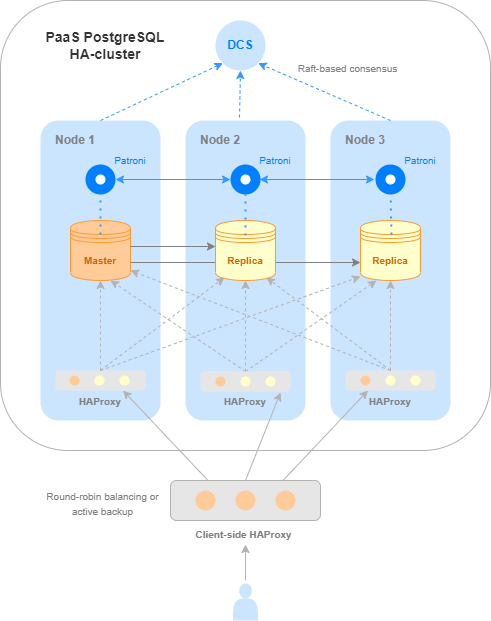
There are many ways to set up and manage replication in PostgreSQL. K2 Cloud uses Patroni to provide a high availability PostgreSQL cluster. This tool automatically monitors node status, manages replication, and switches it over if a cluster node fails.
At any time, only one cluster node can be a master, while the rest are replicas. The master node supports both read and write operations, while replicas support only read operations.
To learn the role of the specific node, send a request to Patroni RestAPI. The API is available on each node on the tcp/8008 service port. You can find the detailed instructions here.
For simplicity and ease of use of the high-availability PostgreSQL service, we built an HAProxy installation into it. HAProxy monitors node roles and automatically routes requests to the master node. HAProxy runs on all cluster nodes (except for the arbiter) on the tcp/5000 port. Thus, this port can be accessed from any node, and HAProxy will send the request to the master node.
To benefit as much as possible from the high-availability service, use HAProxy ports of all nodes when connecting to PostgreSQL. The better way is to configure another balancing service on your application side. You can either use cloud load balancer or deploy your own.
The solution architecture scheme is shown below.
Connecting to the DBMS#
After the successful launch, addresses and ports that the DBMS listens can be found on the PostgreSQL database page.
PostgreSQL instances listen to the tcp/5432 port. Patroni Rest API is available on the tcp/8008 port of these nodes. Use these ports to connect to and further work with the DBMS.
Important
The cluster allows you to maintain the database availability even when a node fails, but only if you use all cluster endpoints, not just one of them.
The DBMS can be managed via the standard psql console client in Linux or through graphical tools such as pgAdmin.
If you want to connect to the PostgreSQL service remotely, be sure to assign an Elastic IP to the instance where the service is deployed and allow connections to the tcp/5432 port in the appropriate security group.
Important
Be careful when permitting access to PostgreSQL from the Internet. We recommend restricting access to individual IP addresses and providing strong passwords.
Logical replication for PostgreSQL#
Replication between PostgreSQL databases allows you to automatically transfer data changes between different instances.
Use cases for replication:
building high-availability solutions;
creating a backup storage site;
migration between clusters;
migration between PostgreSQL DBMS versions.
Logical replication allows you to:
replicate both individual databases and individual tables;
select the operations to be replicated;
perform replication between different PostgreSQL versions.
A detailed description of logical replication can be found in the PostgreSQL documentation.
Key concepts#
PostgreSQL uses the following concepts to describe logical replication:
A publication — determines what data is published.
A subscription — determines the target database that receives changes from the publication.
Setting up replication#
Replication is configured in two stages — at the source (the source database to be replicated) and at the replica (the target database that will be a replica of the source).
Set up the source#
Note
The instruction assumes that the database for which replication is to be configured already exists. If the database has not been created yet, first create it.
Create a separate database user. When creating the user, mark next to the Allow replication field to grant the user data replication rights.
Create a publication in the source database by running the SQL query:
CREATE PUBLICATION <publication_name> FOR TABLE <table_name>;
where:
<publication_name>— the publication name;<table_name>— the table name.
Create a dump of the replicated database using the
pg_dumputility:pg_dump \ "host=<host> \ port=<port> \ dbname=<database_name> \ user=<user_name>" \ --schema-only \ --no-privileges \ --no-subscriptions \ --no-publications \ -Fd -f <dump_directory>
where:
<host>— the IP address or DNS name of the cluster where the source resides;<port>— the port;<database_name>— the name of the source database;<user_name>— the name of the database owner user;<dump_directory>— the directory containing the dump.
Parameters
--schema-only— save only the schema (tables, indexes, views) without copying the data itself;--no-privileges— do not save access rights (GRANT/REVOKE);--no-subscriptionsand--no-publications— do not save logical replication settings;-Fd— the dump format — Directory;-f <dump_directory>— the path to this directory.
Customize a replica#
Create a PostgreSQL database that will be a replica of the source.
Restore the data schema from the dump into the target database using the
pg_restoreutility:pg_restore \ -Fd -v \ --single-transaction -s \ --no-privileges -O \ -h <host> \ -U <user_name> \ -p <port> \ -d <database_name> \ <dump_directory>
where:
<host>— the IP address or DNS name of the cluster where the target database resides;<user_name>— the name of the database owner user;<port>— the port;<database_name>— the name of the database created when configuring the source;<dump_directory>— the directory containing the dump.
Parameters
-Fd (directory format)— indicates that the source dump was created in the directory format;-v(Verbose) — verbose mode;--single-transaction— the entire restore process is performed in a single transaction;-s(Schema only) — restore only the schema (structure);--no-privileges— do not restore access rights (GRANT/REVOKE);-O(No Owner) — do not restore information about object owners.
Create a subscription on the replica by running the SQL query:
CREATE SUBSCRIPTION <subscription_name> CONNECTION
   host=<host>
   port=<port>
   dbname=<database_name>
   user=<user_name>
   password=<password>
PUBLICATION <publication_name>;
where:
<subscription_name>— the subscription name;<publication_name>— the publication name;<host>— the IP address or DNS name of the cluster where the target database resides;<port>— the port;<database_name>— the name of the source database;<user_name>— the name of the source database user;<password>— the user password.
When creating a subscription, PostgreSQL by default uses the copy_data = true parameter to initiate the initial synchronization: all existing data from the published tables is automatically copied to the target database. After this stage is completed, streaming replication is activated, and any new changes made to the source database are transmitted to the target side in real time.
Important
It is recommended not to make changes to the data on the target database side to avoid conflicts during replication. Failure to follow this recommendation may lead to data desynchronization between nodes.
Disabling replication#
To disable replication, perform the following actions:
Disable the subscription on the replica by running the SQL query:
DROP SUBSCRIPTION <subscription_name>;
Delete the subscription at the source by running the SQL query:
SELECT pg_drop_replication_slot('<subscription_name>');
where:
<subscription_name>— the subscription name;
Logical replication limitations#
Database schema changes (DDL operations such as ALTER TABLE, CREATE INDEX, etc.) are not replicated automatically. Tables, indexes, constraints, and other database schema objects must be created/modified separately in the source and target databases. At the same time, table schemas must remain fully compatible.
Sequences (SEQUENCE) are not replicated automatically. When switching the application to the replica, the sequence values must be synchronized separately; otherwise, uniqueness errors may occur when running new INSERT queries.
For correct replication of UPDATE and DELETE operations, tables must have a defined replica identity. It is required so that the row to be updated or deleted can be unambiguously found in the target database. By default, the table primary key (PRIMARY KEY) is used as the identity. If the table has no primary key, the replica identity must be configured manually, for example, using a unique index or by setting the value FULL so that all row columns are replicated.
Logical replication is limited to a single database. A publication is created within a specific database and cannot cover all databases within the same PostgreSQL service.
Adding a table to a publication does not result in its creation on the replica. In this case, you should first:
Create a compatible table in the target database.
Update the subscription, for example, using the SQL queries
ALTER SUBSCRIPTION…REFRESH PUBLICATION.
It is recommended to monitor the availability of the target database. Unavailability can lead to accumulation of Write-Ahead Logs (WAL) and subsequent disk space exhaustion.
Logical replication cannot fully replace physical replication if workloads require high availability (HA) and disaster recovery (DR). For fault-tolerant services with minimal recovery time, physical replication is recommended. Logical replication does not provide an identical copy of the entire PostgreSQL instance.
Redis#
Service launch options#
Single DBMS instance running on a virtual machine instance in a single availability zone.
High-availability DBMS deployed in a cluster of three or six virtual machines in one or three availability zones (if available in the region).
High-availability solution architecture#
There are two high-availability architecture options available for Redis: first, using Sentinel monitoring service and, second, featuring native clustering (in Redis terminology) starting from Redis 3.0. The first option enables high availability for small installations. The second one provides large installations with better scalability and performance.
Redis Sentinel#
K2 Cloud features three-node Sentinel configuration, with master running on one of them and replicas running on the other two (this clusterization option is not supported for a six-node cluster). Both Redis server and Redis Sentinel run on every node. In case of failures and other malfunctions, Sentinel will start automatic failover. For details about Sentinel functionality, see the official documentation.
Sentinel processes interact with each other and monitor the performance of Redis nodes. If Redis node, server or Sentinel service fail, available Sentinel processes start reselecting the master. Then, automated failover starts, the selected replica becomes the new master while the remaining replica is reconfigured to work with the new master. The applications that use Redis server are notified of the new connection address.
Note
Redis uses asynchronous replication, so such a distributed system of Redis nodes and Sentinel processes does not guarantee that confirmed transactions will be actually saved in case of failure.
High-availability Redis service#
A high-availability Redis service is deployed in a cluster consisting of three (or six) instances. Each instance has one master and one replica, and the latter interacts with a master on another node (cross-replication).
Multiple master nodes ensure high performance and linear scalability for a cluster, while having at least one replica per master ensures its high availability. For more information, read the Redis official documentation.
All master nodes share a single data space, which is divided into shards. Thus, each master contains part of the shards (sharding).
When working with a high-availability Redis service, requests are processed by masters. Any master can be accessed for read and write operations. If the requested data is in a shard on another master, then Redis itself will redirect the client to the respective instance to read them.
In the event of a failure of a master instance or the entire node on which the instance is running, automatic failover occurs to a respective replica, which takes on the master role.
Request distribution using HAProxy#
For simplicity and ease of use of the high-availability Redis service, we built an HAProxy installation into it. HAProxy monitors node statuses and roles and automatically distributes requests to only those VM instances acting as masters.
HAProxy runs on the tcp/5000 port on all cluster nodes. Thus, this port can be accessed from any node, and HAProxy will request one of the master nodes.
To benefit as much as possible from the high-availability service, use HAProxy ports of all nodes when connecting to Redis. The better way is to configure another balancing service on your application side. You can either use cloud load balancer or deploy your own.

Solution architecture featuring HAProxy for a high-availability Redis service#
Connecting to the DBMS#
After the successful start, addresses and ports listened by DBMS can be found on the Redis database page. In case of a standalone service, only one endpoint is available for connection, while in case of a high-availability service, there are multiple endpoints depending on the selected architecture.
Redis master instances listen to the tcp/6379 port, while replicas listen to the tcp/6380 port. In the event of a failure of a master instance or the entire node on which the instance is running, automatic failover occurs: the replica becomes a master. Still, it continues to listen to the tcp/6380 port. Therefore, the port number alone is not enough to understand whether an instance is a master or replica if the cluster runs for a long time.
Important
The cluster allows you to maintain the database availability even when a node fails, but only if you use all cluster endpoints rather than any one of them.
Authentication in Redis#
When working in a closed environment, you don’t need to enable authentication in Redis, but you may need to password-protect your installation in an untrusted environment.
You can set the password when creating the database service. After the service has been launched with the specified password, you can access it after authentication (the AUTH command’).
The deployed Redis service can be managed via the standard redis-cli console client in Linux or through graphical tools. A good overview of graphical tools can be found in the blog.
If you want to connect to the Redis service remotely, be sure to assign an Elastic IP to the instance where the service is deployed and allow connections to the tcp/6379-6380 ports in the appropriate security group.
Important
Be careful when permitting access to Redis from the Internet. We recommend restricting access to individual IP addresses and providing strong passwords.
MongoDB#
Service launch options#
Single DBMS instance running on a virtual machine instance in a single availability zone.
High-availability DBMS deployed in a cluster of three virtual machines in one or three availability zones (if available in the region). The cluster can contain:
Three full-featured nodes. Data is distributed across three copies, each of which can be used independently.
Two full-featured nodes plus a cluster arbitrator. This option requires fewer resources and is, therefore, more cost-effective. Only two DBMS nodes (primary and secondary) act as worker nodes, while the third node (arbiter) maintains the cluster quorum. The instance with a cluster arbitrator runs using minimum resources: 2 vCPU, 4 GiB RAM, and 16 GiB volume.
High-availability solution architecture#
A cloud-based MongoDB high-availability service is a replica set — a group of MongoDB instances maintaining the same data set through replication.
There are several roles in a replica set:
primary node for read and write operations;
secondary node for read only operations;
arbiter that neither replicates the data nor participates in user operations.
Data replication is asynchronous: the primary node performs all write operations, then the secondary node reads the description of these operations and asynchronously applies them.
If the primary node becomes unavailable, for example, crashes, the remaining cluster nodes use the quorum rule to determine which of them will take over its role. When the unavailable node is on again, it becomes the secondary one and copies the current dataset from the new primary node. Thus, the primary role can switch from one node to another throughout the cluster lifecycle.
To learn more about the replica set operation, read the official MongoDB ``documentation.
Request distribution using HAProxy#
For better experience with the high-availability MongoDB service, HAProxy is integrated into it. This component monitors the roles of nodes and redirects traffic to the current primary node of the cluster. If a role changes or the cluster’s primary node is unavailable, HAProxy automatically redirects requests to the new primary node.
HAProxy service runs on each of the cluster nodes (except for an arbitrator) at port tcp/5000. Therefore, you can send a request to any node, and HAProxy will automatically route it to the correct destination.
To benefit as much as possible from the high-availability service, we recommend using HAProxy ports on all nodes when connecting to MongoDB. You will need to configure one more load balancer on your application side. You can either use cloud-based load balancer or deploy your own one.
Connecting to the DBMS#
After the successful start, addresses and ports that the DBMS listens to appear on the MongoDB database page. MongoDB instances listen to the tcp/27017 port.
Important
The cluster allows you to maintain the database availability even when a node fails, but only if you use all cluster endpoints rather than any one of them.
MongoDB clients and drivers support a connection string, where you can specify endpoints for a replica set to detect a current primary node and switch to a new node automatically.
Generally, the connection may look like this:
mongodb://mongo1,mongo2,mongo3/?replicaSet="rsmain"
It suffices to specify several nodes for the connection and others will be detected automatically. The replicaSet in such automatically deployed clusters is always called rsmain.
The deployed MongoDB service can be managed using either the standard mongo shell console client in Linux or graphical tools, such as TablePlus or Robo 3T.
To connect to the MongoDB service remotely, follow these steps:
Open the instance page with the running MongoDB service , go to the Network and Security tab and click on the ID of the security group that you plan to use for controlling access from outside.
On the security group page, go to the Inbound rules tab.
Add an enabling rule for the tcp protocol and port
21017.Associate Elastic IP with a network interface of this instance.
Important
Be careful when permitting access to MongoDB from the Internet. We recommend restricting access to individual IP addresses and providing strong passwords.
ClickHouse#
Service launch options#
Single DBMS instance running on a virtual machine instance in a single availability zone.
High-availability DBMS deployed in a cluster of three or six virtual machines in one or several availability zones (if available in the region). In a three-node cluster, all nodes combine the coordinator and server roles. The
three combined nodes and up to twelve servershigh-availability configuration consists of three nodes with the Coordinator+Server role and zero to twelve nodes with the Server role. Thethree coordinators and three to twelve servershigh-availability configuration consists of three nodes with the Coordinator role and three to twelve nodes with the Server role.
High-availability solution architecture#
To ensure fault tolerance and high data availability, ClickHouse is deployed as a cluster. The high-availability architecture separates management and data storage functions. The cluster architecture is divided into two levels:
Coordinators (Keeper nodes) manage metadata and replication and maintain consensus within the cluster. Our service uses the optimized ClickHouse Keeper component.
Servers (Server nodes) store and process data.
For production workloads, combining the coordinator and data server roles on the same node is not recommended.
Depending on the target workload and use cases, we recommend one of two cluster architecture options:
Combined architecture#
This configuration is more cost-effective and is suitable for relatively small workloads or for testing cluster mode. In this configuration, the same nodes act as both coordinators and servers.
Composition: At least three nodes.
Specifics: As the workload increases, we recommend switching to the separated architecture.
Note
If the service is initially deployed on three nodes, it can be scaled further only by adding more servers. The number of coordinators is fixed and always equals three. Under high load, we strongly recommend including additional server nodes in the cluster.
Separated architecture#
This configuration is better suited for production systems. In clusters with the separated architecture, the coordinator and server roles are placed on different virtual machines. A high-availability cluster contains at least two servers, which allows you to create a shard with two replicas for fault tolerance. When a service of six or more nodes is deployed, three separate coordinator nodes and three or more servers are created. The coordinators communicate with each other using the Raft consensus protocol and also support the operation of the servers themselves. The service supports horizontal scaling: two to twelve nodes with the server role can be added to the three coordinator nodes.
Composition: three dedicated coordinator nodes and two or more servers.
Fault tolerance: Ensured by the coordinator quorum and by creating shards with replicas on servers.
Note
When creating the service, set the parameters of coordinator nodes and servers separately.
Node configuration recommendations#
Node role |
vCPU |
RAM |
Disk subsystem |
|---|---|---|---|
Dedicated coordinator |
From 2 vCPUs |
4 GiB |
Data volume from 64 GiB, SSD |
Server (recommended) |
From 8–16 vCPUs |
32–64 GiB |
Data volume from 256 GiB |
Combined node |
From 4 vCPUs |
From 32 GiB |
Data volume from 128 GiB |
Connecting to the DBMS#
Once deployed, the ClickHouse PaaS service accepts client connections on each virtual machine with the Server role. Coordinators do not respond to client connections.
ClickHouse instances (in both high-availability and non-high-availability services) accept connections on ports tcp/8123, tcp/9000, tcp/9004, and tcp/9005.